Posts

Showing posts with the label root

How to run or install same app in android and iPhone (without root and jailbreak)

Image
Now-a- days Social Media platforms are on peak.There are many Social Media platform that provides variety of feature their goal is to provide good service + user friendly interface and every single phone that can communicate with internet has Whatsapp, Facebook & Twitter installed in it...so, we can keep in touch with our friends and family members. Also some Phones have dual sim function especially Samsung Duos Series. Sometimes we need to Use Two different accounts in same phone but signing in and out again & again is fraustating espacially for me because i have to manage multiple accounts for many purpose. So, when this happens we all have a question in our mind "How To Install Same App In Android/iPhone". This is unique because some people dont have enough mind to think question like this :-D Lol joking Last night i have found an amazing application "Parallel Space" for android & iPhone. This app can simulate same app that is already installed ...
How to root Samsung Galaxy Core 2 SM-G335H

Specification About Core 2 NETWORK TechnologyGSM / HSPA 2G bandsGSM 850 / 900 / 1800 / 1900 - SIM 1 & SIM 2 3G bandsHSDPA 900 / 2100 SpeedHSPA 21.1/5.76 Mbps GPRSYes EDGEYes LAUNCH Announced2014, June StatusAvailable. Released 2014, July BODY Dimensions 130.3 x 68 x 9.8 mm (5.13 x 2.68 x 0.39 in) Weight 138 g (4.87 oz) SIM Dual SIM (Micro-SIM, dual stand-by) DISPLAY TypeTFT capacitive touchscreen, 256K colors Size4.5 inches (~65.1% screen-to-body ratio) Resolution480 x 800 pixels (~207 ppi pixel density) MultitouchYes PLATFORM OS Android OS, v4.4.2 (KitKat) CPU Quad-core 1.2 GHz MEMORY MicroSD up to 64 GB Internal 4 GB, 768 MB RAM CAMERA Primary 5 MP, 2592 Ñ… 1944 pixels, autofocus, LED flash FeaturesGeo-tagging, touch focus, face/smile detection Video 480p@30fps Secondary VGA SOUND Alert typesVibration; MP3, WAV ringtones LoudspeakerYes 3.5mm jackYes COMMS WLANWi-Fi 802.11 b/g/n, Wi-Fi Direct, hotspot Bluetoothv4.0, A2DP GPSYe...

How to Root QMobile Noir i10 & CWM Recovery

Image
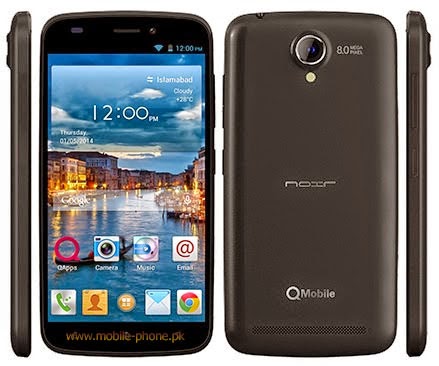
Today we'll root Qmobile Noir i10 and also we'll flash CWM recovery to make this android phone more powerfull and kindly follow the instructions as mentioned in the post to avoid any problems :D Ok lets Root this Beast :) -First download this .zip file which contain all the important things you need in this rooting + Flashing recovery procedure. Download Here -Enable Usb Debugging -Download and install android adb drivers from here -Download Sp Flash Tools From here (From XDA) -Now turn off your phone wait for 10 seconds after power off -Now connect it to pc & open SP Flash Tools -Then Click on Scatter-Loading & choose the scatter .txt where you extracted the .zip file  CATION!!!: Only Mark Recovery.img Unmark Preloader+ Mbr + EBR1 + UBOOT +SEC_RO ETC only choose recovery.img   now copy SUPER SU UPDATE.ZIP to Sd card And reboot phone into recovery mode by pressing Power Button+Volume Down now you are in CWM Recovery there choose 2nd ...

How to Root Nokia X2 Android Phone (Friendly trick) :)

Image
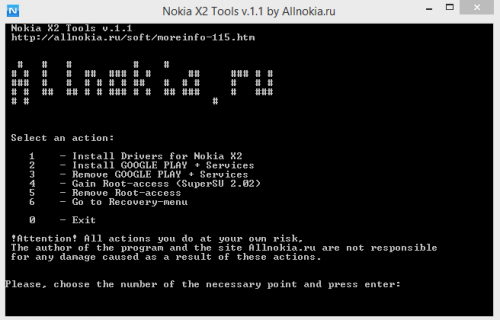
Nokia X2 , which is ironically the last device launched under the Nokia X brand can easily be rooted. Nokia X2 Tools, a Windows utility developed by the Russian fan site (AllNokia.ru) can be used to root Nokia X2 phones easily and without the hassle of typing in the commands in the terminal window.  You can still use the tool if you’ve updated your Nokia X2 to version 2.1.  There is also towelroot method which does not require a PC, but does not seem to be working on phones updated to 2.1. Method 1: Using Nokia X2 Tools Rooting the Nokia X2 is a two-step process when using the Nokia X2 Tools. Follow the steps below to successfully root your Nokia X2 Android phone. Caution@ Do NOT use this tool to install Play Store as your device might get brick ed. 1:Turn on USB Debugging on your Nokia X2 (Settings> Developer options> USB Debugging) 2:Download Nokia X2 tools from here . Run the exe file when downloaded.   You will see above screen after openi...

How to disable bloatware apps without root

Image
  Disable bloatware apps without root You don't need to fully delete bloatware apps to get some peace of mind -- you can disable them and  even stop them from popping notifications. This won't delete the actual application, but it'll be removed from your homescreen/app drawer, and we'll even show you how to free up some space in the process. Simply follow the simple steps outlined in the gallery below, and you're set.  A lot can be said about the toxicity of bloatware apps, but since this guide will be about how to get rid of them, we won't indulge in needless discussion. For those of you not in the know, 'bloatware' refers to all that extra stuff that's been pre-loaded on your device, before you even got to your neighborly carrier's outlet. These often come in considerable numbers, are sometimes downright irritating and take up space, and worst of all -- can't be removed by normal means. The situation is so bad, really, that countrie...

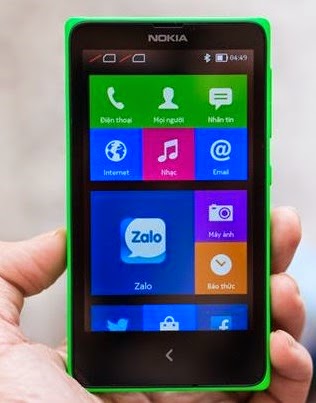
How to Root Nokia X and Nokia XL X_O

Image
Before rooting the Nokia X and Nokia XL you need to do following things: Download Nokia X Manager from  here (Note: Nokia X manager works only on Windows PC and requires DOT NET framework 4) Enable USB Debugging mode Launch device settings. Tap  Developer options  in the  System  section. Switch on developer options and tap  OK  in the query dialog shown. Enable  USB debugging  in the  Debugging  section and tap  OK  in the query dialog shown. Update(or install) Nokia X USB drivers, Download it from  here . Goto desktop on PC Right click on computer and click manage Select Device manager In the list, Nokia X will be listed with a Question mark icon. Right click and select  update driver , then select  Browse my computer for driver option. Now select the path of above extracted folder, in the folder select driver file. Now drivers are updated. Steps for Rooting Nokia X and Nokia X...